
Stop Getting Generic Answers: How to Write Better ChatGPT Prompts
Stop getting generic answers. Learn exactly how to improve your ChatGPT prompts with the 4-pillar framework: Role-play, Chain-of-Thought, Context injection, and Output Contracts.
If you have ever typed a question into ChatGPT and received a response that felt off-target, generic, or just plain unhelpful, the problem almost certainly was not the AI — it was the prompt.
Quick Summary:
- 4-Pillar Framework: Always include Role, Objective, Context, and Output Contract.
- Expert Roles: Assign a specific persona (e.g., Senior Marketer) to anchor tone and domain knowledge.
- Output Contracts: Explicitly define the format (Table, JSON, List) to avoid walls of text.
- Few-Shot Examples: Provide 2-3 examples of the desired output to guide the model's pattern recognition.
- Chain-of-Thought: Use "think step-by-step" to improve reasoning accuracy in complex tasks.
Learning how to improve your ChatGPT prompts is the single most high-leverage skill you can develop as an AI user in 2026. This guide gives you a complete, practitioner-tested framework: from first principles to advanced techniques, real examples, and hands-on tools you can use today.
New here? Start on our homepage for a quick overview of how ImprovePrompt.ai works, then come back to go deep on the strategies below.
Why Improving Your ChatGPT Prompts Changes Everything
ChatGPT is a next-token prediction machine. It has no opinions, no memory between sessions, and no way to read your mind. Every word in your prompt is a signal — and weak signals produce weak output. The research is unambiguous: structured prompts can improve response quality by 30–50% compared to conversational requests, without changing the underlying model at all.
Think of it like giving directions. "Head downtown" and "take I-90 eastbound, exit at Pine St, then turn left at the traffic light" will get you to very different places. ChatGPT needs the second version every single time.
The True Cost of Vague Prompts
Beyond getting a bad answer, a vague prompt costs you time (re-running the conversation), tokens (API users pay for every back-and-forth), and creative momentum. If you use ChatGPT for work — writing, coding, analysis, customer support — even a 20% improvement in first-attempt accuracy translates directly into real productivity gains.
The 6-Layer Prompt Architecture
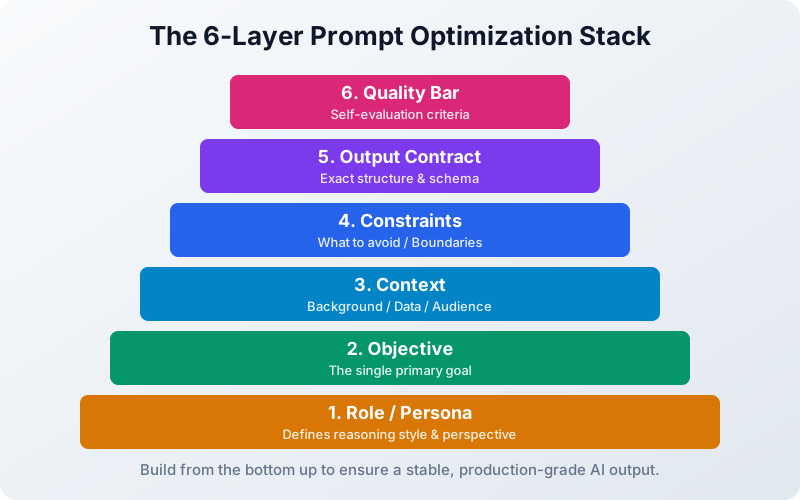
Every high-quality prompt contains some combination of the following six layers. You do not always need all six, but knowing them lets you diagnose exactly why a prompt is underperforming.
| Layer | What It Does | Example |
|---|---|---|
| Role | Sets the model's perspective and tone | "You are a senior marketing strategist with 15 years of SaaS experience." |
| Objective | States the single, primary task | "Write a 200-word product description for our new AI writing assistant." |
| Context | Supplies background the model needs | "Our target user is a solo content creator who struggles with writer's block." |
| Constraints | Defines what to avoid or limit | "Do not use jargon. Keep sentences under 20 words. Avoid passive voice." |
| Output Contract | Specifies format and structure | "Return three short paragraphs: hook, benefits, CTA." |
| Quality Bar | Sets the standard to aim for | "Write at the level of a top-tier SaaS landing page." |
Start by adding just Role + Objective + Output Contract to your next prompt. You will notice the difference immediately.
Techniques to Improve Your ChatGPT Prompts Right Now
Here are the most effective, battle-tested techniques ranked by ease of implementation.
1. Assign an Expert Role
Role assignment is the lowest-effort, highest-impact improvement you can make. It tells ChatGPT which knowledge domain to draw from and what voice to use.
Before:
Explain compound interest.
After:
You are a certified financial planner explaining concepts to a first-time investor in their 20s. Explain compound interest in plain language with a concrete example using $1,000 over 10 years at 7% annual return.
The improved prompt produces a response that is specific, audience-matched, and instantly usable.
2. Use Few-Shot Examples
Few-shot prompting gives ChatGPT a pattern to match by showing it 2–3 examples before your actual request. This is especially powerful for formatting, tone replication, and reasoning style.
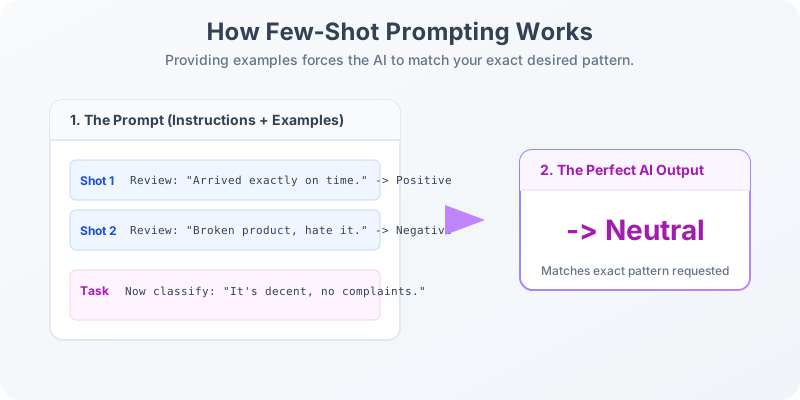
Classify the following customer reviews as Positive, Negative, or Neutral.

Review: "Arrived on time and exactly as described." → Positive
Review: "Packaging was damaged but the product works." → Neutral
Review: "Complete waste of money. Broke after one day." → Negative

Now classify: "It's okay, nothing special but does the job."
Few-shot works particularly well for classification, code generation, and any task where you have strong opinions about the output style.
3. Chain-of-Thought (CoT) Prompting
For complex reasoning tasks — math problems, strategic plans, logical analysis — instructing the model to think step-by-step dramatically improves accuracy.
A store is running a 25% discount on a $120 jacket. The customer has a $10 gift card. Think through each step before giving the final price the customer pays.
Adding "think through each step" or "reason step by step before answering" reduces errors in analytical tasks by instructing the model to show its work rather than leap to a conclusion.
4. Specify Your Output Format
One of the most wasted opportunities in prompting is failing to define the output shape. ChatGPT will default to a dense paragraph when you might actually need a table, bullet list, JSON, markdown, or numbered steps.
Vague:
Give me ideas for a social media campaign.
Precise:
Give me 5 social media campaign ideas for a sustainable fashion brand targeting millennials. Format: a numbered list. For each: Campaign Name (bold), Platform, Hook (1 sentence), Call to Action (1 sentence).
5. Use Negative Constraints
Telling ChatGPT what not to do is just as important as telling it what to produce. Negative constraints eliminate the most common failure modes before they happen.
Write a cover letter for a software engineering role.
- Do NOT use "I am passionate about" or "team player"
- Do NOT exceed 250 words
- Do NOT use a formal salutation — start directly with the hook
6. Iterate on One Variable at a Time
The fastest way to master prompting is to treat it like a controlled experiment. Change one element per run — the role, the constraints, the output format — and compare results side by side. This discipline builds an intuition for what each layer actually contributes to the final output.
Common Prompt Mistakes and How to Fix Them
| Mistake | What Goes Wrong | The Fix |
|---|---|---|
| Vague action verbs ("do something") | ChatGPT does not know what task to perform | Use specific verbs: summarize, compare, rewrite, classify, generate |
| Over-specifying irrelevant context | Dilutes the signal; model tries to satisfy too many constraints | Use bullet-point requirements so constraints are scannable |
| Asking multiple unrelated questions in one prompt | Model splits attention and gives shallow answers to each | Break into separate, focused prompts |
| No output format defined | You get a wall of prose when you needed a table or list | Always define structure: "Format as a markdown table with columns X, Y, Z" |
| Forgetting to state your audience | Response is pitched at the wrong knowledge level | Add: "Explain this to a [beginner / senior engineer / C-suite executive]" |
Improve Your ChatGPT Prompts With System Messages
If you access ChatGPT via the API or a custom GPT, the system message is your most powerful lever. Unlike user messages, it persists throughout the entire conversation — it's the standing instruction set that governs every response.
A well-written system message eliminates the need to repeat role and constraint instructions in every turn:
System: You are an expert technical documentation writer. Always write in second person, use active voice, keep sentences under 25 words, and format all code in markdown blocks. Never add filler phrases like "Great question!" or "Certainly!".
With this system message in place, every user message benefits from the defined role, voice, and constraints automatically.
Reusable Prompt Templates for High-Frequency Tasks
The best prompt engineers do not write from scratch every time. They build and reuse templates for recurring tasks. Here are three to copy today:
Blog Post Outline:
You are an SEO content strategist. Create a detailed outline for a 1,500-word blog post targeting the keyword "[KEYWORD]". Audience: [DESCRIBE AUDIENCE]. Include H2 and H3 sections, a suggested meta description, and 3 internal link opportunities. Format as a structured markdown outline.
Email Rewrite:
Rewrite the following email to be [more professional / more concise / warmer in tone]. Preserve all factual content. Cut filler words. Keep it under [WORD COUNT] words. Do not change the subject line.
[PASTE EMAIL]
Code Review:
You are a senior [language] developer reviewing code for a production application. Review the following function for: (1) correctness, (2) edge cases, (3) readability, (4) performance. Format as a numbered list. Provide corrected code if changes are needed.
[PASTE CODE]
For hundreds more ready-to-use templates across marketing, coding, customer support, and more, explore the Prompt Library.
Measuring Whether Your Prompts Have Improved
Improvement is meaningless without measurement. Use this simple self-assessment framework after every prompt session:
- First-attempt usability — Can you use the response without editing it? Score 1–5.
- Format accuracy — Did the output match the structure you requested? Yes / No.
- Relevance depth — Did the model address the actual question, or stay surface-level? Score 1–5.
- Token efficiency — Did you need follow-up questions, or was one prompt enough?
Track these scores across 10 prompts before and after applying the techniques above. The data will show you exactly where your prompting still has room to grow.
Related reading: How to Improve My AI Prompts for Better Outputs dives into the full Prompt Optimization Stack and the science behind token efficiency.
Try the Free Prompt Optimizer
Reading about prompting techniques is step one. Step two is applying them to your actual work — and that is where our free tool comes in.
Use the ImprovePrompt Optimizer → — paste any prompt and get an AI-rewritten version that applies role assignment, output format specification, constraints, and quality standards automatically. It also explains why each change was made, so you learn while you improve.
Written by Engineering Team, ImprovePrompt. Last updated March 5, 2026.
Frequently Asked Questions
What is the fastest way to improve your ChatGPT prompts?
How long should a ChatGPT prompt be?
Does prompt engineering work the same way on all AI models?
What is few-shot prompting and when should I use it?
Can I use the same prompt for ChatGPT, Claude, and Gemini?
Start Writing Better Prompts
Ready to put these techniques into practice? Our free AI prompt optimizer analyzes your intent and rewrites your request for maximum effectiveness.
Optimize Your Next Prompt Now