
AI Image Prompts That Actually Work: Midjourney & DALL-E Secrets (2026)
Generate breathtaking AI art with these image generation AI prompts. Master lighting physics, camera lenses, and composition for Midjourney and DALL-E.
Introduction: Master Image Generation AI Prompts Today
Quick Summary:
- Master Architecture: Use SUBJECT + ENVIRONMENT + COMPOSITION + LIGHTING + STYLE + CAMERA + QUALITY + NEGATIVES.
- Lighting Physics: Specify Cinematic Rim Lighting, Volumetric God Rays, or Chiaroscuro for depth.
- Camera Simulation: Invoke lens physics (e.g., 85mm f/1.8) to eliminate the "AI look."
- Negative Prompting: Use mathematical barriers to prune common artifacts like extra limbs.
The visual landscape of the internet has been permanently altered by tools like Midjourney, DALL-E 3, and Stable Diffusion. However, as any early adopter knows, there is a massive chasm between typing a basic idea into a discord bot and extracting a breathtaking, highly controlled, professional-grade image. If you are tired of generating random, unpredictable AI art with six fingers and physics-defying lighting, you need to master image generation AI prompts.
Unlike text-based Large Language Models (LLMs) that thrive on logical reasoning and step-by-step instructions, diffusion models (the architecture behind AI image generation) process natural language entirely differently. They act as complex visual rendering engines. To achieve mastery over image generation AI prompts, you must stop treating the AI like an illustrator and start treating it like a combination of a highly specific casting director, a rigorous cinematographer, and a meticulous lighting technician.
In this comprehensive, 2026-updated guide, we will break down the professional mental models, required syntax, and advanced architectural frameworks necessary to write world-class image generation AI prompts. By the end of this deep dive, you will have the structural formula to guarantee photorealism, exact subject fidelity, and perfect composition.
The Core Mental Model for Image Generation AI Prompts
Image prompting is fundamentally about scene specification. When an amateur writes an image prompt, they typically describe a subject and perhaps an action: "A woman walking down a street in the rain." While the model will generate an image based on this phrase, it has to guess at hundreds of visual variables: What is the lighting? What lens is being used? What era is this? What is the art style? What is the composition framing?
To consistently create professional images, you must eliminate the model's need to guess. At an advanced, production level, you actively manage all these variables through a strict architectural framework. We call this the Master AI Image Prompt Architecture.
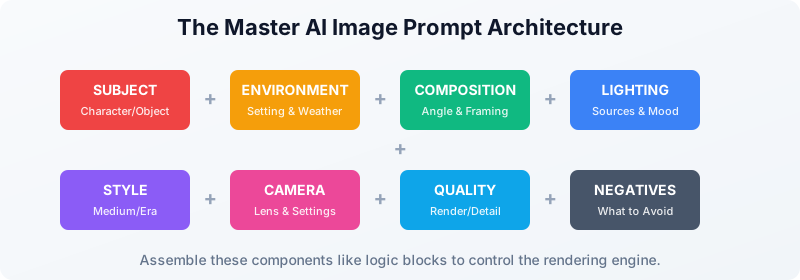
Every highly reliable, world-class image generation AI prompt explicitly answers four core categories of questions:
- What exactly is in the frame? (Subject, Environment, Props)
- How is the scene being captured? (Camera Lens, Angle, Composition)
- How should the scene be lit and styled? (Lighting physics, Art Medium, Era)
- What must absolutely be avoided? (Negative Prompting, Artifact control)
If you memorize and ruthlessly apply this framework, the quality of your image generation AI prompts will skyrocket immediately.
New to AI? Check out our general Prompt Engineering for Beginners guide to understand baseline mechanics before moving into visual generation.
The Master Formula: Scene Specification
The production formula for superior visual outputs strings together specific "blocks" of instruction. Think of these as modular components of a larger prompt.
The Production Formula:
SUBJECT + ENVIRONMENT + COMPOSITION + LIGHTING + STYLE + CAMERA + QUALITY + NEGATIVES
Let's break down exactly how to execute each module effectively.
1. The Subject (Your Primary Visual Anchor)
The subject is where the model will dedicate the majority of its computational attention. You must be relentlessly specific. Vague subjects yield generic faces and inconsistent attire. Specify age, ethnicity, exact clothing, emotion, and pose.
- Amateur: "A cyberpunk hacker."
- Professional: "A 24-year-old Scandinavian male, intense focused expression, wearing an oversized matte-black techwear jacket with subtle neon-blue geometric stitching, holographic visor reflecting code matrices, typing rapidly."
2. The Environment (Establishing Context and Realism)
The environment dictates the background, but more importantly, it deeply influences the lighting behavior and color palette of the entire image. If you place a subject in a neon-lit alley, the reflections on their skin and clothing will adapt to that environment.
- Example: "Standing in a claustrophobic, rain-soaked Tokyo alleyway at 2:00 AM. Puddles on the broken asphalt reflecting vibrant pink and cyan neon signs. Background is slightly obscured by heavy atmospheric fog."
3. Composition (The Most Ignored Lever)
Amateurs let the AI decide where to place the subject. Professionals dictate the framing. This is crucial for narrative impact and graphic design utility (e.g., leaving negative space for text).
- Terminology to utilize:
Extreme close-up macro eye shot,Medium portrait from the chest up,Full body wide shot,Dutch angle,Over-the-shoulder view,Bird's-eye view,Symmetrical Wes Anderson framing,Rule of thirds positioning.
4. Lighting: The Absolute Quality Multiplier
If there is one secret to transforming your image generation AI prompts from amateur to breathtaking, it is lighting. Precise lighting terminology forces the model to render physical light accurately, which drastically enhances photorealism and depth. A poorly lit prompt will look "AI-generated." A flawlessly lit prompt looks like an award-winning photograph or a $100 million movie frame.
- Key Lighting Terms:
Cinematic rim lighting,Soft diffused highly-bounced light,Harsh chiaroscuro shadows,Volumetric god rays filtering through dust,Studio three-point lighting setup,Golden hour warm backlighting,Bioluminescent ambient glow.
5. Style (Controlling the Medium)
Unless you strictly want default photorealism, you must define the artistic medium and era. Avoid lazy modifiers like "in a beautiful style" or "masterpiece." Be explicitly technical.
- For Illustration:
1980s dark fantasy oil painting,Studio Ghibli style cel-shaded anime,Vintage 1930s travel poster lithograph,Intricate pen and ink crosshatching. - For 3D/Digital:
Unreal Engine 5 architectural render,Octane Render with global illumination,ZBrush 3D sculpt style,Isometric voxel art.
6. Camera & Lens Physics (For Ultimate Photorealism)
If you want an image that looks like it was taken by a human photographer rather than a computer, you must invoke physical camera settings. Diffusion models have learned the optical characteristics of specific lenses. When you include these in your image generation AI prompts, the model simulates depth of field, lens distortion, and grain.
- Portrait Photography:
Shot on 85mm lens, f/1.8 aperture, shallow depth of field, bokeh background.(This isolates the subject and blurs the background beautifully). - Street/Documentary:
Shot on 35mm lens, Fujifilm Superia X-TRA 400 film stock, f/5.6 aperture, gritty street photography, high ISO grain. - Landscape/Wide:
Shot on 14mm ultra-wide lens, f/11 deep focus, Ansel Adams landscape style.
Negative Prompts: What NOT to Do
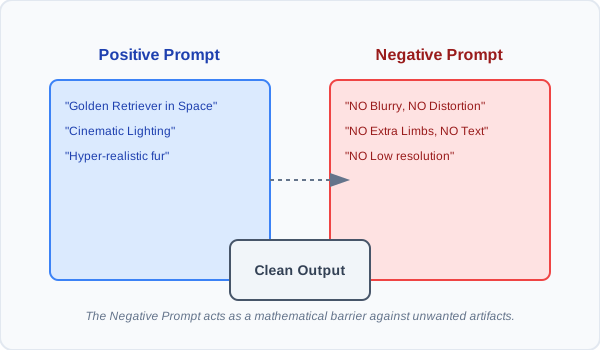
One of the most powerful tools in your arsenal when formulating image generation AI prompts is the negative prompt. While the main prompt tells the AI what you want to see, the negative prompt establishes a mathematical barrier against elements you want to suppress.
In Stable Diffusion and Midjourney (via the --no parameter), negative prompts steer the generation away from common AI failures. If you are struggling with mutated hands, blurry backgrounds, or watermark text, a robust negative prompt solves these issues 90% of the time.
A standard, robust negative prompt for photorealism:
Negative Prompt: "blurry, out of focus, deformed, mutated hands, extra limbs, poorly drawn face, text, watermark, signature, cartoon, illustration, low resolution, ugly, flat lighting, overexposed, oversaturated"
Advanced Techniques for Unrivaled Photorealism
1. The Power of "Raw" Parameters
Many models now offer a "raw" style parameter (e.g., Midjourney's --style raw). This forces the model to ignore its default "beautification" training and instead strictly adhere to your prompt's literal instructions. If you are writing highly sophisticated camera and lighting instructions, using the raw parameter prevents the AI from overriding your aesthetic choices with its generic "pretty" default style.
2. Texture and Micro-Detail Injection
To push an image from "good" to "hyper-realistic," you must specifically request micro-details. AI images often look plastic because they lack the imperfections of reality.
- Additions:
Pores and skin texture visible,scuff marks on the metal armor,dust particles suspended in the air,fuzz on the wool sweater,micro-scratches on the glass lens.
3. Subject Weighing and Multiprompting
Advanced users of Midjourney can utilize a syntax called multiprompting (::), which allows you to assign specific mathematical weights to different concepts to blend them perfectly.
- Syntax Example:
A sleek futuristic sports car::2 driving through a dense Victorian jungle::1. This tells the AI to prioritize the car's existence twice as much as the jungle environment.
Model-Aware Prompting: Adapting to the AI Engine
A critical aspect of mastering image generation AI prompts is recognizing that the same prompt will yield vastly different results across different models. You must tailor your language to the specific engine you are utilizing.
- Midjourney (v6+): Midjourney thrives on highly descriptive, natural language wrapped around photographic terminology. It is highly stylistic by default. It responds brilliantly to specific lighting and camera constraints, and formatting parameters like
--ar 16:9(aspect ratio) and--stylize 250. - DALL-E 3 (via ChatGPT): DALL-E 3 relies heavily on its backend LLM to interpret conversational language. It favors extreme literalism and spatial relationships. It is the best model for exact text rendering and complex scene composition ("A dog sitting on the left side of a red couch holding a blue sign that says 'HELLO'"). It requires fewer technical camera keywords and more narrative descriptions.
- Stable Diffusion (SDXL/SD3): Stable Diffusion represents the hardcore, open-source approach. It requires the most strict syntax, heavy reliance on powerful negative prompts, and often keyword weighting
(keyword:1.5). It is unparalleled for fine-tuned control when combined with ControlNet to mimic specific poses or depth maps.
(For detailed strategies on LLM interactions that can help generate these prompts, check our guide on How to Improve Your ChatGPT Prompts).
Professional Iteration Workflows
Do not fall into the trap of trying to write a single, massive, 100-word prompt on your first try and expecting perfection. Professional generative artists iterate in systematic passes.
The 4-Pass Workflow:
- Pass 1 (The Core Idea): Start simple. Test your subject and environment to ensure the base concept translates. (e.g., "A golden retriever sitting in a futuristic spaceship.")
- Pass 2 (Pose and Composition): Adjust framing and action. (e.g., "A golden retriever looking out the window of a futuristic spaceship, over-the-shoulder shot.")
- Pass 3 (Lighting and Physics): Add your multipliers. (e.g., "Cinematic blue rim lighting, soft glowing instrument panels reflecting in the dog's eyes.")
- Pass 4 (Polish and Parameters): Add camera specifics, textures, and negative prompts, and run multiple variations. (e.g., "Shot on 35mm lens, highly detailed fur texture, f/2.8... --ar 16:9 --v 6.0")
Conclusion: Stop Guessing, Start Engineering
Crafting effective image generation AI prompts is no longer a dark art; it is a structured engineering process. By explicitly defining the subject, commanding the composition, invoking physical lighting and camera lenses, and utilizing strict negative constraints, you seize control of the rendering engine.
As you continue to build your visual repertoire, test these frameworks rigorously. To save time and get a head start, you can access dozens of pre-tested, high-quality image frameworks in our dedicated Prompt Library.
If you want to instantly elevate a basic idea into a professional-grade prompt without memorizing the technical syntax, simply paste your core idea into our Free Prompt Optimizer Tool, and our system will automatically expand your concept using the Master Architecture Framework, injecting the perfect lighting, composition, and camera terminology for stunning results.
Start engineering your prompts today, and bridge the gap between imagination and flawless digital reality.
Written by Engineering Team, ImprovePrompt. Last updated March 8, 2026. Return to our homepage to explore more intelligent AI strategies.
Frequently Asked Questions
What is the secret to photorealistic image generation AI prompts?
How do I use negative prompts effectively in AI image generation?
Why does my Midjourney image look completely different from my prompt?
Does 'Masterpiece, highly detailed, 8k' actually improve AI images?
Start Writing Better Prompts
Ready to put these techniques into practice? Our free AI prompt optimizer analyzes your intent and rewrites your request for maximum effectiveness.
Optimize Your Next Prompt Now