
10 Cheat-Code Prompt Templates That Get Perfect Responses Every Time
Discover 10 battle-tested prompt templates that consistently produce perfect AI responses. Copy, customize, and deploy these frameworks for any task.
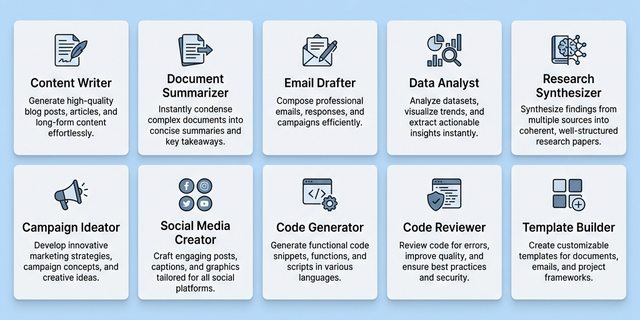
Why Prompt Templates Transform Your AI Workflow
Quick Summary:
- Role-Based Priming: Always start with a
[ROLE]to lock in domain-specific vocabulary. - Contextual Grounding: Provide a
[CONTEXT]block to avoid generic, "skip-the-latte" advice. - Constraint Enforcement: Use
[GUARD]tags to explicitly forbid clich\u00e9s or hallucinations. - Output Schemas: Define a strict
[FORMAT](Markdown, JSON, or XML) to ensure parseable results. - Iterative Refinement: Use the
[QUALITY]meta-template to help the AI self-audit its logic.
The difference between professionals who consistently extract brilliant AI outputs and those who struggle with generic, unusable responses almost always comes down to one thing: prompt templates. 🏘 In the rapidly maturing AI landscape of 2026, writing instructions from scratch for every interaction is not just inefficient—it is actively sabotaging your results. A well-designed prompt template is a reusable, battle-tested instruction framework that eliminates guesswork and guarantees a baseline of quality no matter which AI model you use.
Think of prompt templates as the equivalent of software design patterns. A developer does not reinvent the Observer pattern or the Factory pattern for every new project; they apply proven architectural solutions that have been refined by thousands of engineers over decades. Prompt templates operate on the same principle. They encode the structural wisdom of expert prompt engineers into a portable, repeatable format that anyone—from marketing managers to senior software architects—can deploy immediately.
In this comprehensive guide, we present 10 meticulously designed prompt templates that cover the most common and high-impact use cases in professional AI interaction. Each template has been tested across ChatGPT, Claude, and Gemini to ensure cross-model compatibility. Whether you are drafting executive communications, analyzing datasets, debugging code, or generating creative content, these templates will transform your results from the very first use. If you are new to the concept of structured prompting, we recommend first reading our Prompt Engineering for Beginners guide to understand the foundational principles.
The Anatomy of Effective Prompt Templates
Before diving into the specific templates, it is critical to understand what makes a prompt template effective.
Visual: The five-component anatomy of a high-performance prompt template.
The order matters: Role primes the model's vocabulary and perspective. Context grounds it in your specific situation. Task defines the singular objective. Format ensures parseable output. Guard rails prevent hallucinations and drift. When all five are present, the model has everything it needs to produce a perfect response on the first attempt.
For a deeper exploration of why each layer matters, see our complete breakdown of how to improve AI prompts for better outputs.
Prompt Templates #1–3: The Foundation Set
These three templates cover the workloads that 80% of professionals perform daily: writing content, summarizing documents, and sending emails.
Template #1: The Professional Content Writer
[ROLE]
You are a senior content strategist and copywriter with 15 years of experience in {industry}. You write in a tone that is {tone: authoritative / conversational / technical}.

[CONTEXT]
Target audience: {describe audience demographics and knowledge level}.
Brand voice: {describe brand personality}.
Key message: {core takeaway the reader should remember}.

[TASK]
Write a {word_count}-word {content_type: blog post / landing page / newsletter} about {topic}. Include a compelling hook in the first paragraph, {number} subheadings, and a clear call to action at the end.

[FORMAT]
Output in Markdown with H2 and H3 headers. Use short paragraphs (3-4 sentences max). Include a TL;DR summary at the top in bold.

[GUARD]
Do not use the following phrases: "In today's fast-paced world", "It's important to note", "In conclusion". Do not exceed the word count by more than 10%. Do not invent statistics without labeling them as estimates.
This template eliminates the most common failure mode in AI writing: generic, robotic prose. By specifying the brand voice, forbidden clich\u00e9s, and paragraph length constraints, the output reads like it was written by a human professional.
Template #2: The Document Summarizer
[ROLE]
You are a senior executive assistant who excels at distilling complex documents into clear, actionable summaries.

[CONTEXT]
DOCUMENT TO SUMMARIZE:
\"\"\"
{paste_full_document_here}
\"\"\"

[TASK]
Summarize the above document in exactly {number} bullet points. Each bullet must contain one key insight and one actionable takeaway.

[FORMAT]
- **Key Insight:** {insight}
  - *Action:* {what the reader should do with this information}

[GUARD]
Do not introduce any information not present in the original document. If the document is ambiguous on a point, flag it as "[Ambiguous in source]" rather than making assumptions.
Template #3: The Email Drafter
[ROLE]
You are a professional business communicator writing on behalf of {sender_name}, {sender_title} at {company}.

[CONTEXT]
Relationship with recipient: {new contact / ongoing client / internal team member}.
Previous interaction: {brief summary or "First contact"}.
Objective of this email: {schedule meeting / follow up / deliver bad news / request information}.

[TASK]
Draft a {length: brief / standard / detailed} email to {recipient_name}. The email must achieve the stated objective while maintaining a {formal / semi-formal / casual} tone.

[FORMAT]
Subject line: {generate a compelling subject line}
Body: {the email}
P.S.: {optional postscript if appropriate}

[GUARD]
Keep the email under {number} sentences. Do not use exclamation marks more than once. Do not start with "I hope this email finds you well."
Advanced Prompt Templates for Data Analysis and Research
These templates are designed for professionals who need AI to process data, extract insights, and produce analytical outputs.
Template #4: The Data Analyst
[ROLE]
You are a senior data analyst at a Fortune 500 company. You communicate findings clearly to non-technical stakeholders.

[CONTEXT]
DATA:
\"\"\"
{paste_data_table_or_CSV_here}
\"\"\"
Business question: {what the stakeholder wants to know}.

[TASK]
Analyze the provided data to answer the business question. Identify the top 3 trends, flag any anomalies, and provide a recommendation.

[FORMAT]
1. **Executive Summary** (2 sentences)
2. **Key Trends** (numbered list)
3. **Anomalies** (if any, with severity rating: Low/Medium/High)
4. **Recommendation** (1 paragraph)

[GUARD]
Do not perform statistical tests you cannot show the math for. If the data is insufficient to answer the question, state "Insufficient data" and explain what additional data would be needed.
Template #5: The Research Synthesizer
[ROLE]
You are a research fellow at a leading think tank, specializing in {domain}.

[CONTEXT]
Research question: {question}.
Sources provided:
\"\"\"
{paste_multiple_sources_here}
\"\"\"

[TASK]
Synthesize the provided sources into a balanced analysis. Present arguments from multiple perspectives and identify areas of consensus and disagreement among the sources.

[FORMAT]
- **Thesis:** {one-sentence summary}
- **Supporting Evidence:** {bulleted list}
- **Counterarguments:** {bulleted list}
- **Gaps in Research:** {what remains unknown}
- **Conclusion:** {balanced assessment}

[GUARD]
Cite sources by referencing them as [Source 1], [Source 2], etc. Do not introduce knowledge from outside the provided sources. If sources contradict each other, present both positions without picking a winner.
Creative and Marketing Prompt Templates
Creativity thrives within constraints. These templates prove that structured prompts produce far more original and usable creative output than open-ended requests.
Template #6: The Marketing Campaign Ideator
[ROLE]
You are a creative director at a top-tier advertising agency known for viral campaigns. You think in terms of hooks, emotional triggers, and shareability.

[CONTEXT]
Product: {product_name} — {one_sentence_description}.
Target demographic: {age, interests, pain points}.
Campaign budget tier: {bootstrap / mid-range / enterprise}.
Primary channel: {social media / email / display ads / video}.

[TASK]
Generate 5 distinct campaign concepts. For each concept, provide: a campaign name, a one-sentence hook, the emotional lever it pulls, and one example piece of creative copy.

[FORMAT]
| # | Campaign Name | Hook | Emotional Lever | Sample Copy |
|---|---|---|---|---|

[GUARD]
Avoid clich\u00e9d marketing phrases ("game-changer", "revolutionary", "best-in-class"). Each concept must be fundamentally different in approach—not just variations on a theme.
Template #7: The Social Media Creator
[ROLE]
You are a social media strategist who has grown multiple accounts past 100K followers. You understand platform-specific algorithms and engagement patterns.

[CONTEXT]
Platform: {Twitter/X / LinkedIn / Instagram / TikTok}.
Account niche: {topic}.
Current follower count: {number}.
Goal: {grow followers / drive traffic / build authority / generate leads}.

[TASK]
Create {number} posts optimized for {platform}. Each post must include the main text, suggested hashtags, and a recommended posting time.

[FORMAT]
**Post {n}:**
Text: {post content}
Hashtags: {3-5 relevant tags}
Best time to post: {day and time with timezone}
Expected engagement type: {saves / shares / comments / clicks}

[GUARD]
Each post must be under {character_limit} characters. Do not use more than {number} emojis per post. Avoid clickbait tactics that could trigger platform penalties.
Browse our curated Prompt Library for hundreds more marketing and creative templates that are ready to deploy immediately.
Technical and Coding Prompt Templates
For developers and engineers, these templates eliminate the frustrating cycle of AI-generated code that almost works but requires significant debugging. For a deeper dive into coding-specific strategies, see our guide on how to optimize AI prompts for coding.
Template #8: The Code Generator
[ROLE]
You are a staff software engineer at a FAANG company, specializing in {language/framework}. You write production-quality code with proper error handling, type safety, and documentation.

[CONTEXT]
Project: {brief_project_description}.
Existing stack: {languages, frameworks, databases}.
Relevant existing code:
~~~{language}
{paste_existing_code_here}
~~~

[TASK]
Implement {feature_description}. The implementation must integrate cleanly with the existing code above.

[FORMAT]
1. **Approach** (3-sentence summary of your strategy)
2. **Code** (complete, runnable implementation with inline comments)
3. **Tests** (at least 2 unit tests covering happy path and edge case)
4. **Integration Notes** (how to wire this into the existing codebase)

[GUARD]
Do not use deprecated APIs. Do not add dependencies that are not already in the existing stack without explicitly flagging them. Handle all error cases—never use bare try/catch with pass or empty catch blocks.
Template #9: The Code Reviewer
[ROLE]
You are a principal engineer conducting a thorough code review. You are constructive but direct, and you prioritize correctness, security, and maintainability.

[CONTEXT]
Code to review:
~~~{language}
{paste_code_here}
~~~
Pull request description: {what the author says this code does}.

[TASK]
Review the code above. Categorize your findings by severity and provide specific, actionable feedback with code suggestions.

[FORMAT]
**Critical Issues** (must fix before merge):
- {issue}: {explanation} → Suggested fix: `{code}`

**Improvements** (should fix):
- {issue}: {explanation} → Suggested fix: `{code}`

**Nits** (optional polish):
- {issue}: {explanation}

**Praise** (what was done well):
- {positive observation}

[GUARD]
Do not rewrite the entire file. Focus on the diff. Do not suggest purely stylistic changes unless they impact readability for the team. Always explain *why* something is an issue, not just *what* to change.
The Universal Meta-Template: Prompt Template #10
This is the template that generates other templates. When you encounter a new, unfamiliar task and none of the nine templates above apply, use this meta-template to construct a custom prompt on the fly.
Template #10: The Template Builder
[ROLE]
You are an expert prompt engineer who designs production-grade prompt templates for enterprise AI deployments. You have deep expertise in ChatGPT, Claude, and Gemini instruction optimization.

[CONTEXT]
I need to use AI for the following task: {describe_your_task_in_plain_language}.
The AI model I am using is: {model_name}.
My skill level with prompt engineering is: {beginner / intermediate / advanced}.

[TASK]
Design a reusable prompt template optimized for the task described above. The template should include clearly labeled sections with placeholder variables in {curly_braces} that I can fill in for each use.

[FORMAT]
Output the template in a code block with the following sections:
1. [ROLE] — with a placeholder for domain expertise
2. [CONTEXT] — with placeholders for required background information
3. [TASK] — with the core objective parameterized
4. [FORMAT] — with a specific output structure
5. [GUARD] — with at least 3 negative constraints relevant to the task
6. [QUALITY] — with a self-evaluation instruction

[GUARD]
The template must be model-agnostic (work on any major LLM). Do not include hard-coded values—everything specific to a single use case must be a placeholder. The template must be under 300 words.
This meta-template is the ultimate force multiplier. Once you have it in your toolkit, you never need to stare at a blank prompt box again.
How to Customize These Prompt Templates for Your Workflow
A template is only as valuable as your ability to adapt it to your specific context. Here are the three principles for effective customization:
1. Start with the closest template, then modify. Do not try to build a perfect template from scratch. Take the template that most closely matches your use case and adjust the role, constraints, and format to fit your exact needs.
2. Save your modified templates. Once you have customized a template and confirmed it produces excellent results, save it in a document, a Notion database, or a dedicated prompt management tool. The value of prompt templates compounds over time as your library grows.
3. Version your templates. Just like code, templates should be versioned. When you discover that adding a specific constraint improves results, create a v2 of that template. Track what changed and why, so you can roll back if a modification degrades quality.
Visual: A side-by-side comparison showing why template-driven prompts dramatically outperform vague instructions.
Start Using These Prompt Templates Today
You now have 10 professional-grade prompt templates that cover writing, analysis, research, marketing, coding, and even template creation itself. But reading about templates is not enough—the real transformation happens when you start using them.
Here is your action plan:
- Pick the three templates most relevant to your daily work.
- Save them in a document you can access instantly.
- Use them for your next five AI interactions without modification, just to feel the difference in output quality.
- Then customize by adjusting the role, constraints, and format to match your exact needs.
If you want to skip the manual customization entirely and have your prompts automatically optimized for any AI model, try our free Prompt Optimizer tool on the homepage. Simply paste your rough idea, and our engine will restructure it using the same frameworks behind these templates—instantly producing a production-ready prompt optimized for ChatGPT, Claude, or any model you choose.
Conclusion
The era of typing vague, conversational requests into AI and hoping for the best is over. The professionals who are extracting maximum value from generative AI in 2026 have one thing in common: they use prompt templates. These structured frameworks turn AI interaction from an unpredictable art into a repeatable science. By adopting the 10 templates in this guide, you gain a systematic approach to every major AI use case—from a simple email draft to a complex multi-source research synthesis.
Remember, the quality of your AI output is a direct reflection of the quality of your input. A vague prompt produces vague results. A template-driven prompt, built on the five pillars of Role, Context, Task, Format, and Guard, produces exceptional results consistently. Start with these templates today, build your personal library, and never settle for mediocre AI responses again.
Written by Engineering Team, ImprovePrompt. Last updated March 14, 2026. Explore our full homepage for more resources.
Frequently Asked Questions
What is a prompt template?
Can I use the same prompt template for different AI models?
How many prompt templates do I need?
Do prompt templates work with image generation AI?
How do I know if my prompt template is working?
Start Writing Better Prompts
Ready to put these techniques into practice? Our free AI prompt optimizer analyzes your intent and rewrites your request for maximum effectiveness.
Optimize Your Next Prompt Now